DNS Client
Domain Name System (DNS) is a database system that translates a computer's fully qualified domain name into an IP address. If a DNS server cannot fulfill your request, it refers the request to another DNS server - and the request is passed along until the domain-name-to-IP-address match is made.
This option enables you to configure the client side (Resolver). If there is no existing DNS configuration, the option Configure DNS is displayed. If already configured, the option Modify DNS is displayed.
|
➢
|
To Configure the DNS Client: |
|
1.
|
From the Network Configuration menu, choose DNS Client, press Enter, in the sub-menu, choose Configure DNS, and then press Enter. |
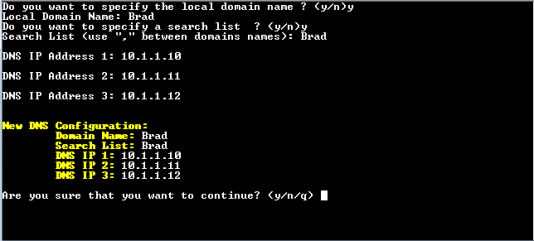
DNS Setup
|
2.
|
Specify the location domain. Type y to specify the local domain name or type n, and then press Enter. |
|
3.
|
Specify a search list; type y to specify a list of domains (use a comma delimiter to separate search entries in the list) or type n, and then press Enter. |
|
4.
|
Specify DNS IP addresses 1, 2 and 3, and then press Enter. |
|
5.
|
Type y to confirm your configuration; the new configuration is displayed. |